🚀 Automating File Routing in Box with AWS Lambda & Webhooks
Business Applications Specialist (Technical Product Manager) - Doctors of BC | 2025
Problem Statement
Box Relay is a powerful workflow automation tool for many content-centric processes. However, one of its limitations is that it doesn’t support routing files to folders based on custom metadata values.
For example, you might want all uploaded invoices tagged with department=HR to go into a dedicated folder for Human Resource, and those tagged with FR into Finance's folder. Relay cannot directly express this routing logic, especially when combined with complex metadata validation.
The result?
- Manual file moves by end users.
- Error-prone processes that break compliance rules.
- Increased administrative burden and cost.
Solution
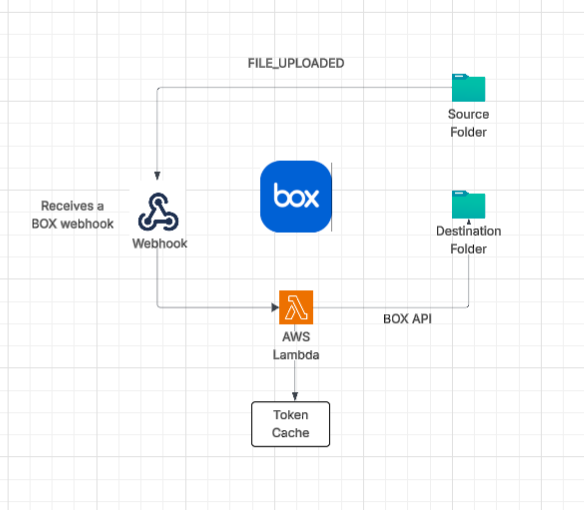
By leveraging AWS Lambda and Box Webhooks, we can create a lightweight, scalable solution to automatically route files as soon as they land in an intake folder. The flow looks like this:
- A file is uploaded into the intake folder in Box.
- Box fires a FILE.UPLOADED webhook.
- AWS Lambda receives the event, fetches the file metadata, and applies routing logic.
- Based on metadata values (e.g., company ID, region, department), the Lambda moves the file to the correct destination folder.
This approach is:
Architecture Overview
Tech Stack
- AWS Lambda (Node.js 18+) – Event-driven serverless function.
- Box Webhooks – Event notification mechanism on file activity.
- Box Content & Metadata API – To fetch file details, metadata, and perform moves.
- AWS API Gateway (optional) – For routing and securing webhook calls.
- AWS CloudWatch – For structured logging, error monitoring, and metrics.
Possible Applications
- Multi-Company Intake – Shared service centers where incoming documents must be separated by client or legal entity.
- Departmental Workflows – HR, Finance, and Legal documents automatically routed to correct departmental repositories.
- Records Management – Apply retention categories via metadata and route to correct lifecycle folders.
- Global Operations – Region-based folder routing to enforce data residency (e.g., EU vs. US storage).
- Customer Onboarding – Automatically placing uploaded contracts, IDs, and forms into customer-specific folders.